Aether: Design System Generator
2025
Personal
Hackathon
Gen AI
Vibe Coding
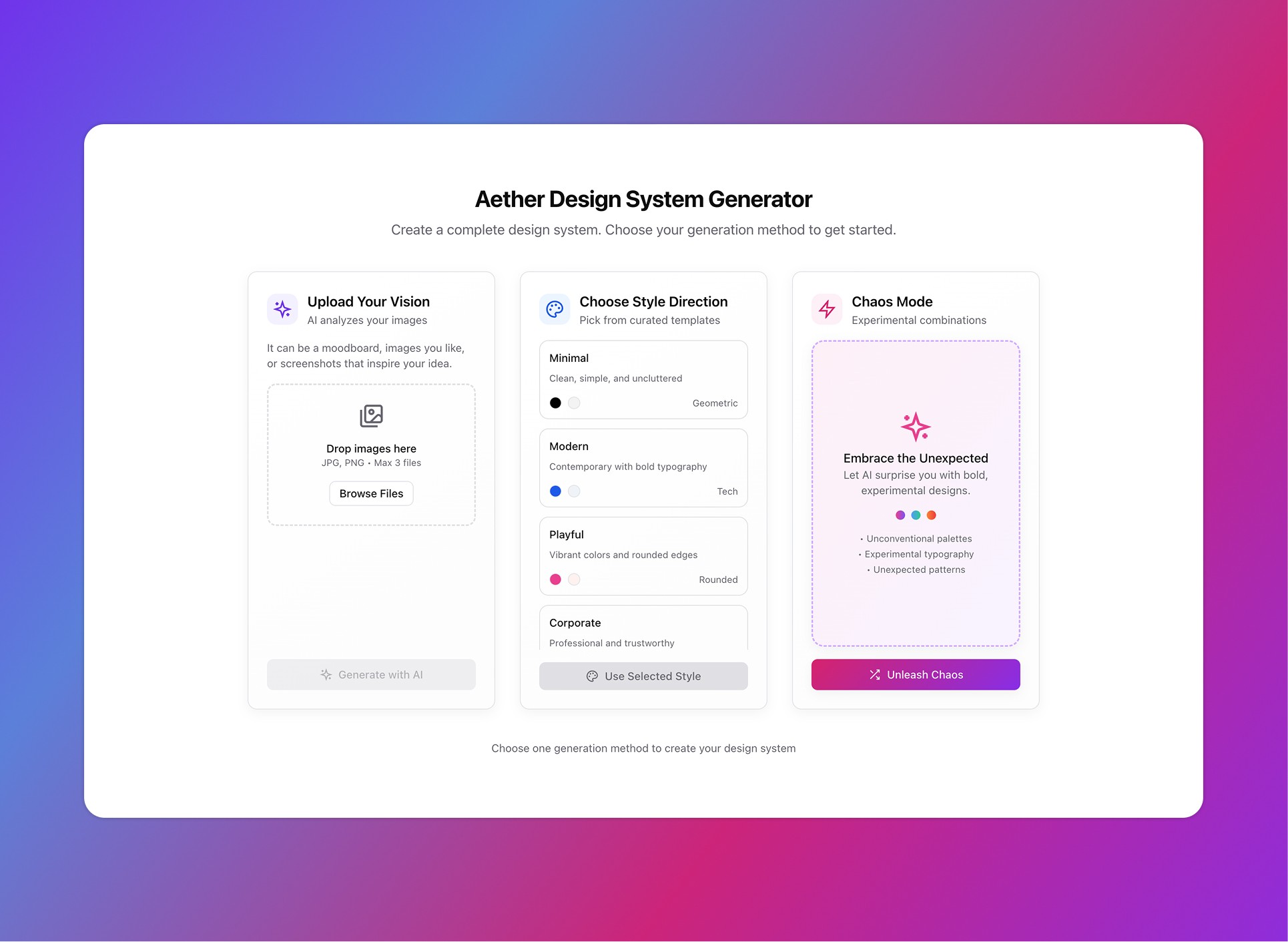
I noticed many designers feel a loss of control with new "prompt-first" AI tools, a stark contrast to their systematic, design-system-first workflow.
My idea was to create a bridge that lets designers start from a familiar place to build a code-based foundation for this new AI-powered world.
You get to choose from 3 options:
Upload your moodboard or inspiration images.
Select from pre existing systems.
Or hit "Chaos Mode" and let AI do the thinking.
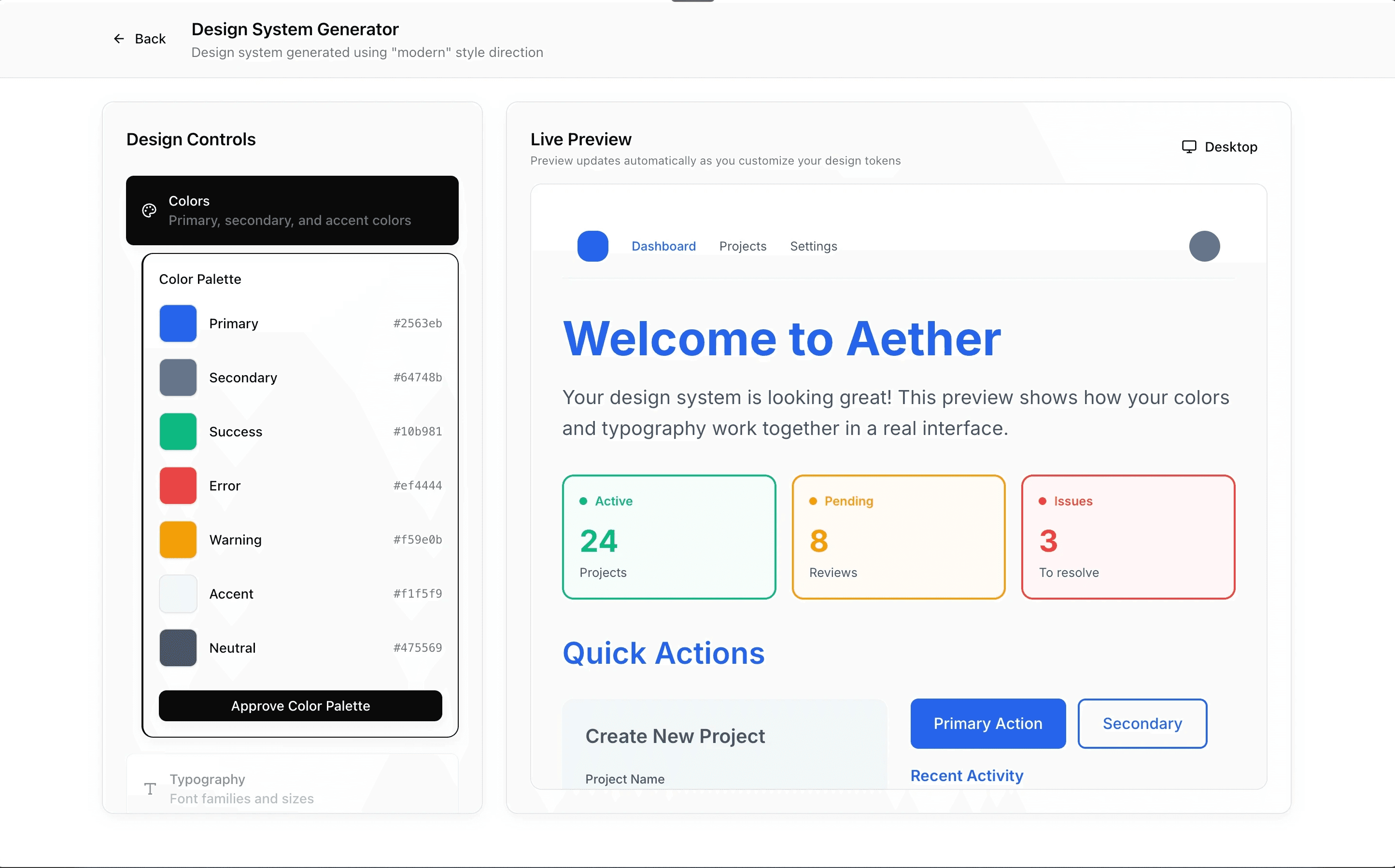
You can then customize and toggle the design tokens and components while viewing the changes in live preview till you are satisfied.
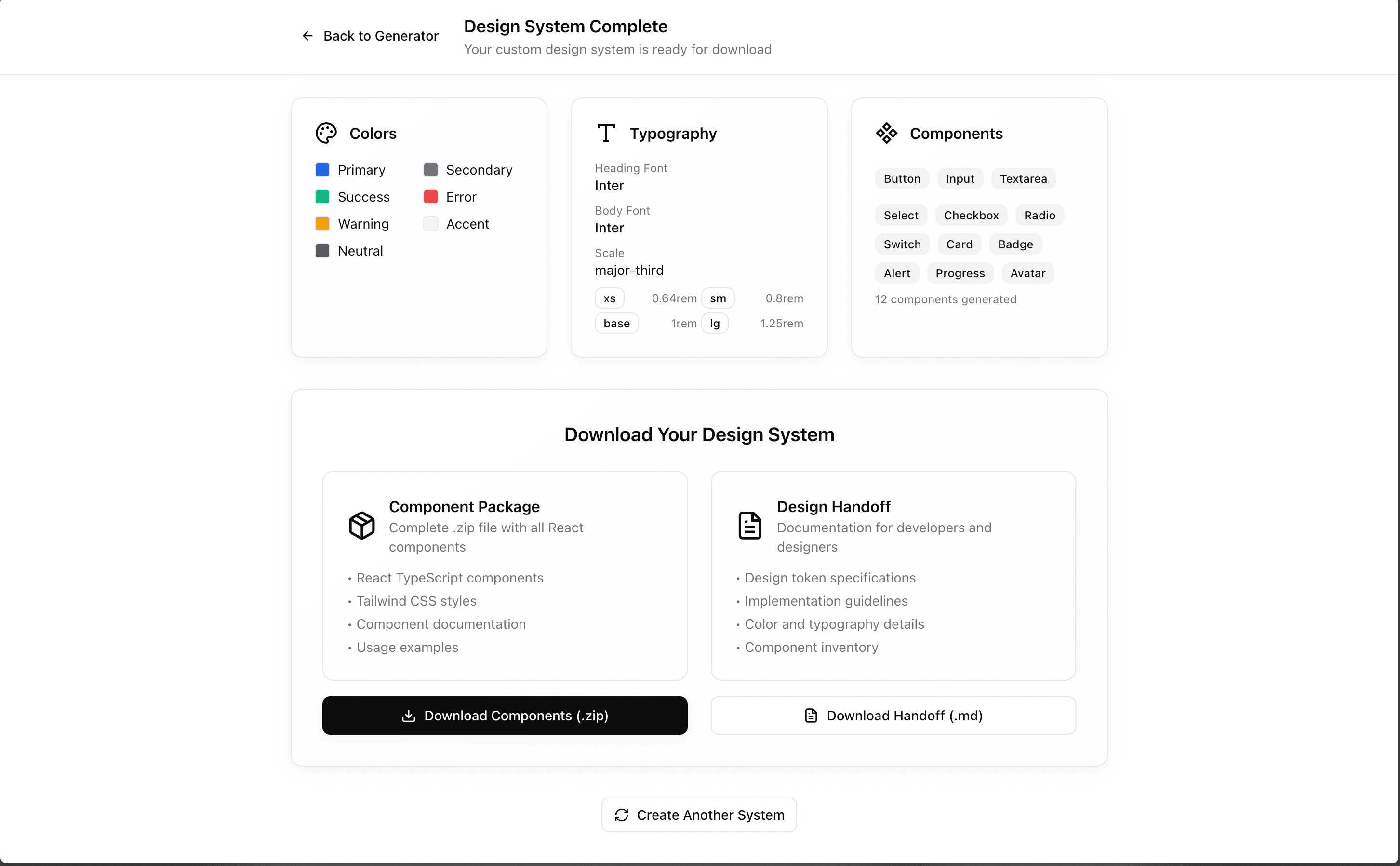
After everything is done, the generator creates Typescript Components.
You can download the zip and can drag and drop the components over vibe coding tools for AI to generate designs using them.
Or you can send those to development team so that they have more time to focus on functionality and less over aesthetic.
This project started as an entry for Figma Make-a-thon but I decided to polish it further. It is still an MVP and my goal is to make it a finished product.
My Role
Tools Used






Laying up the Ground Work
My process began with deep research, analyzing not just the Makeathon entries that were uploaded, but the professional backgrounds and aesthetic tastes of the judges themselves.
I leveraged the BMAD method from BMAD code to create this one. I fed this analysis into the BMAD's Analyst agent to identify their specific preferences in design, code, and innovation, ensuring my concept would resonate.
Brainstorming Session Summary
Topic: Ideas for projects for an entry towards the Figma Makeathon.
Session Goals: To conduct a broad exploration of original project ideas that will stand out from existing entries and appeal to the Makeathon's judges. The final concept must align with the Makeathon's guidelines, focusing on creativity, innovation, and cleverness within the Figma ecosystem.
Techniques Used: What If Scenarios, Yes, And..., Reversal/Inversion.
Total Ideas Generated: 1 primary project concept with 6 feature pillars.
Key Themes Identified:
- AI-Enhanced Creativity Tools
- Next-Generation Developer Handoff
- Interactive & Experimental Design
Technique Sessions
------------------
**What If Scenarios, Yes, And... - 25 minutes**
Description: This session combined proposing "what if" scenarios to spark initial concepts, followed by the "Yes, And..." technique to collaboratively build upon the core idea. Ideas Generated:
- Core Concept: A responsive web application that generates a complete design system based on a user-provided Figma moodboard.
- Analysis Phase: The tool will perform image classification, sentiment analysis, and semantic analysis on the moodboard elements to understand the user's intended theme and design direction.
- AI Integration: The tool will allow users to optionally provide a Google AI Studio (Gemini) API key for more advanced AI-powered analysis. The key will be securely hashed, and users will be informed of the security measures.
- Guided Selection Process: The app will guide the user through a step-by-step process to select color palettes, typography pairs, button styles, and form fields, showing live previews of their choices on a sample UI.
- Final Output: The process culminates in a fully generated design system with icons, components, and documentation for its use case.
- Developer Handoff: The final output is a live, interactive documentation site (the web app itself) that provides developers with production-ready, theme-able code snippets (React with TypeScript) for each component, integrating principles from Figma's Code Connect.
Insights Discovered: The most powerful idea is the seamless integration from a purely inspirational asset (a moodboard) to a fully functional, developer-ready design system with live documentation. This directly addresses a real-world workflow challenge.
**Reversal/Inversion - 10 minutes**
Description: We reversed the typical goal of a design tool ("how to be helpful") to its opposite ("how to break rules") to spark unconventional ideas. Ideas Generated:
- "Chaos Mode": A sixth "personality" for the design system generator. It prompts the user to select two contradictory themes (e.g., Sci-Fi and Minimalism) and merges them to create a unique, unexpected, and creatively challenging design system.
Insights Discovered: Adding an experimental, "anti-design" feature can be a major differentiator, appealing directly to judges who value originality and creative coding.
Idea Categorization
-------------------
Immediate Opportunities
- Figma Makeathon Project: "Aether Design System Generator"
- Description: A responsive web app where users authenticate with their Figma API key (and optionally a Gemini API key) to generate a complete, production-ready design system from a Figma moodboard.
- Why immediate: The concept is a perfect fit for a hackathon, leveraging Figma's core technologies to produce a novel and highly useful tool.
- Resources needed: Figma API knowledge, Gemini API knowledge, frontend web development skills (React/TypeScript recommended).
Future Innovations
- Multi-Platform Code Generation
- Description: Extend the code generation to support not just React, but also Vue, Angular, or native mobile frameworks like SwiftUI and Jetpack Compose.
- Development needed: Significant work to create code generation logic for each new framework.
Moonshots
- Real-time Collaborative Moodboarding
- Description: Allow multiple users to edit the moodboard in real-time within the app, with the generated design system updating live as they collaborate.
- Transformative potential: Would create a truly dynamic and collaborative design tool.
- Challenges to overcome: Significant technical complexity in managing real-time updates and component regeneration.
Action Planning
---------------
Top 3 Priority Ideas
- #1 Priority: Core Moodboard-to-Component Pipeline
- Rationale: This is the MVP. The app must successfully analyze a moodboard and guide a user through selecting colors, typography, and basic components.
- Next steps: Define the specific analysis logic and the step-by-step UI flow for component selection.
- #2 Priority: Live Documentation & Code Handoff
- Rationale: This feature provides the "Next-Gen Handoff" angle and is a key differentiator. It makes the tool useful for both designers and developers.
- Next steps: Plan the UI for the interactive preview and code snippet generation.
- #3 Priority: Implement the 6 "Design Personalities"
- Rationale: This is the "cleverness" and "creativity" hook. The ability to generate themed systems (Vanguard, Artisan, Kinetic, Amplify, Focused, and Chaos Mode) makes the tool unique and memorable.
- Next steps: Define the stylistic rules for each personality that will govern the component generation.
Reflection & Follow-up
----------------------
What Worked Well: Combining multiple brainstorming techniques allowed us to build a simple initial idea into a multi-faceted and robust project concept. The constraints from the judge profiles were invaluable.
Areas for Further Exploration:
- What specific list of contradictory themes should be offered in "Chaos Mode"?
- How will the UI for the step-by-step component selection process work?
Using that research as a constraint, the Analyst agent facilitated a brainstorming session where we generated the core concept for Aether. We firstly landed on a moodboard-to-design-system generator, a novel idea that addressed a real workflow gap for designers entering the AI space.
Aether Design System Generator Product Requirements Document (PRD)
==================================================================
Goals and Background Context
----------------------------
Goals
- Win the Makeathon: Be selected as a winning submission by the judges by excelling in creativity, innovation, and cleverness.
- Demonstrate a Novel Workflow: Clearly showcase an innovative application of Figma Make that solves a real-world problem for designers and developers.
- Deliver a Polished Demo: Create a compelling and functional prototype of the core MVP workflow within the 48-hour timeframe, free of significant bugs.
Background Context
Modern AI-powered design tools like Figma Make introduce a new "prompt first" paradigm that can be disorienting for designers accustomed to a more systematic workflow of manually defining design tokens and creating component libraries. This shift creates a "cold start" problem, hindering adoption and making designers feel a loss of control.
The "Aether Design System Generator" addresses this workflow gap by hyper-accelerating the familiar first step: it automates the creation of foundational components and global CSS based on a designer's inspiration. By providing ready-to-use, themed React/TypeScript (.tsx) code components for direct use in Figma Make, the tool makes the AI-powered creation process feel more intuitive and familiar. This empowers designers to confidently adopt these powerful new tools, starting from a structured foundation rather than a blank canvas.
Change Log
| Date | Version | Description | Author |
| --- | --- | --- | --- |
| Sep 09, 2025 | 1.0 | Initial PRD draft from Project Brief | John (PM) |
Requirements
------------
Functional
- FR1 (Modified): The application must provide two distinct user workflows: an AI-Powered Path where the application either uses a pre-configured backend API key or prompts the user to provide their own, and a Pre-defined Path allowing users to select from curated design system "personas".
- FR2 (Revised): The AI-Powered Path must support user input by allowing the upload of a single JPEG or PNG image export of their moodboard.
- FR3 (Replaced): The application must feature a guided, interactive UI for system generation that follows a sequential, step-by-step process.
- 3.1 Sequential Unlocking: UI customization sections (e.g., Color, Typography, Components) must unlock one by one.
- 3.2 Iterative Selection: For each step, the user must have the option to accept the AI-generated suggestion or re-generate it.
- 3.3 Customization Flow: The selection process must follow a specific order: 1st Color Palette, 2nd Typography, 3rd a core component set (Button, Input Field, Checkbox, Link).
- 3.4 Live Preview Pane: A live preview template must be displayed on the page, updating in real-time as the user makes selections.
- 3.5 Preview Content & Modes: The preview must showcase the design system applied to standard layouts (e.g., a page hero, a dashboard, a form) and be toggled between desktop/mobile views and light/dark modes.
- 3.6 Interactive Adjustments: The user must be able to lock in preferred selections and adjust options, with changes reflected in the live preview.
- FR4 (Revised): The selection UI must include a built-in accessibility check for color contrast.
- FR5: The final output must include downloadable, themed React/TypeScript (
.tsx) component files.
- FR6 (Revised): The final output must include a basic, downloadable handoff documentation Markdown file that summarizes the selected design tokens.
- FR7: The application must include a feature to generate a design system based on the merging of two contradictory themes ("Chaos Mode").
- FR8 (Revised): Generated
.tsxfiles must be able to be dragged into a new Figma Make file, be immediately rendered, and respond to a basic modification prompt.
- FR9 (New): If the user chooses the AI-Powered Path but a key is not provided, the application must prompt them to acquire one from Google AI Studio, providing a direct link.
- FR10 (New): The typography selection step must allow the user to choose a font from a pre-defined list and select a spacing preset.
Non Functional
- NFR1 (Revised): The core user workflow, measured from the moment a user uploads an asset to the moment the download links are available, must take less than 5 minutes.
- NFR2: The application must be a responsive web app, accessible on modern desktop and mobile browsers.
- NFR3: The frontend web application must be hosted on Figma Sites.
- NFR4: A serverless Node.js backend is required for secure API key interactions (if implemented).
- NFR5 (Revised): For the Makeathon demo, the LLM API key will be handled on the client-side with the explicit understanding that this is an insecure shortcut. A secure, serverless backend is a top priority for any post-MVP development.
- NFR6: All tools and services used must have a free tier sufficient for the hackathon.
- NFR7: The prototype must be able to use a pre-cached successful LLM API response as a fallback for the demo.
User Interface Design Goals
---------------------------
Overall UX Vision
The overall UX vision is to provide a seamless and rapid on-ramp for designers into a code-first AI workflow. The tool should feel empowering, giving the user a strong sense of creative control while automating the tedious manual setup of components.
Key Interaction Paradigms
- Sequential Guided Flow: The user will be guided through a linear, step-by-step process where customization sections unlock sequentially.
- Live Interactive Preview: All user selections will be reflected in real-time in a comprehensive preview pane, providing immediate feedback.
- Iterative Generation: At key steps, the user will have the option to re-generate the AI's suggestions until they are satisfied.
Core Screens and Views
The application will function as a single-page application that transitions between three primary states: 1\. Input State (where the user provides assets), 2\. Generator State (the main interactive UI), and 3\. Completion State (where download links are provided).
Accessibility
The application's output will adhere to accessibility standards. The built-in color contrast checker (FR4) will ensure that all generated color combinations meet a minimum of WCAG 2.1 Level AA compliance.
Branding
The branding for "Aether" should be clean and minimalist, primarily using a monochrome color scheme for the tool's own UI. This ensures the design system being generated in the preview is always the primary visual focus.
Target Device and Platforms: Web Responsive
The application will be a responsive web app. To accommodate smaller viewports, the layout will shift from a two-column (side-by-side controls and preview) on desktop to a single-column (controls on top, preview on bottom) on mobile.
Technical Assumptions
---------------------
Repository Structure
Two separate repositories (one for the frontend application, one for supporting files/backend if needed).
Service Architecture
None (for MVP). The frontend will make direct, client-side calls to the external Google AI API.
Testing Requirements
The testing strategy will focus on Unit Tests plus a key integration test for the client-side API call to the external LLM.
Additional Technical Assumptions and Requests
- Frontend Language/Framework: React with TypeScript.
- Hosting: The frontend web application will be hosted on Figma Sites.
Epic 1: Aether Design System Generator MVP
------------------------------------------
Goal: The primary goal of this epic is to deliver a complete, end-to-end, and demonstrable prototype for the Figma Makeathon. It will encompass the entire user journey, from providing an inspirational asset to downloading a functional, themed set of React components.
Stories
Story 1.1: Project Scaffolding & Welcome UI
- As a user, I want to see the welcome screen and have a clear option to upload my inspirational asset, so that I can begin the design system generation process.
- Acceptance Criteria:
- A new React + TypeScript project is created and configured.
- The application displays a welcome message and a title.
- A unified "Upload Asset" area is visible, allowing the user to upload a single JPEG or PNG image.
- A section for selecting pre-defined "personas" is visible.
Story 1.2: Interactive Selection UI & Live Preview Shell
- As a user, I want to see the interactive generator layout with a live preview area, so that I can understand the steps involved and see where my design system will appear.
- Acceptance Criteria:
- After providing an asset, the UI transitions to the generator state.
- A two-column layout is displayed.
- The controls column contains disabled containers for "Color Palette," "Typography," and "Components."
- The preview column contains a placeholder layout and toggles for light/dark mode and desktop/mobile view.
Story 1.3: AI-Powered Color Palette Generation & Application
- As a user, I want the tool to analyze my inspiration and generate a color palette, so that my design system has a thematic foundation.
- Acceptance Criteria:
- The UI prompts for an LLM API key.
- After submitting an asset, a loading indicator appears, followed by the display of a generated color palette.
- The live preview pane immediately updates to reflect the new color palette.
- A "Re-generate" button is available.
- Upon accepting the colors, the "Typography" section is unlocked.
Story 1.4: Typography & Spacing Selection
- As a user, I want to select a font and a spacing preset, so that I can define the typographic scale of my design system.
- Acceptance Criteria:
- The "Typography" section contains a dropdown to select a font and options to select a spacing preset.
- The selection immediately updates the live preview.
- Upon accepting the typography, the "Components" section is unlocked.
Story 1.5: Component Customization UI
- As a user, I want to see and adjust minor options for my generated components, so that I can fine-tune the final output.
- Acceptance Criteria:
- The "Components" section displays customization controls for the core components (Button, Input Field, Checkbox, Link).
- Adjusting a control (e.g., button padding) updates that component in the live preview.
Story 1.6: Theme-to-Code Generation Engine
- As a developer, I need a function that takes the final design tokens and returns strings of
.tsxcode, so that the user's choices are translated into components.
- Acceptance Criteria:
- A function accepts a token object (colors, fonts, etc.) as input.
- The function returns an array of strings, with each string containing valid
.tsxcode for a component.
- The generated code is syntactically correct.
Story 1.7: Asset Packaging & Download
- As a user, I want to download a single ZIP file containing all my generated component files, so that I can easily import them into my project.
- Acceptance Criteria:
- A "Generate Final Assets" button is available.
- Clicking the button takes the generated code strings, creates a ZIP file, and initiates a browser download.
Story 1.8: Documentation Handoff
- As a user, I want to download a summary of my design choices, so that I have a record of my design tokens.
- Acceptance Criteria:
- The completion state provides a download link for a
handoff.mdfile summarizing the selected tokens.
Story 1.9: Chaos Mode
- As a user, I want to try "Chaos Mode" for creative inspiration, so that I can explore unique designs.
- Acceptance Criteria:
- A "Chaos Mode" option on the welcome screen allows the selection of two personas to merge.
- The generation process uses the merged theme.
I then transitioned to the Product Manager agent, providing it the brainstorming output to create a detailed Product Requirements Document (PRD). This document defined the full MVP scope, from the dual AI and pre-defined user paths to the experimental "Chaos Mode" feature.
Aether Design System Generator UI/UX Specification
======================================================
Introduction
----------------
This document defines the user experience goals, information architecture, user flows, and visual design specifications for the Aether Design System Generator. It serves as the foundation for visual design and frontend development, ensuring a cohesive and user-centered experience.
**Change Log**
| Date | Version | Description | Author |
| --- | --- | --- | --- |
| Sep 09, 2025 | 1.1 | Added clarifications distinguishing the app's UI from the generated UI. | Sally (UX Expert) |
| Sep 09, 2025 | 1.0 | Initial collaborative draft | Sally (UX Expert) |
**Overall UX Goals & Principles**
- Target User Personas:
- The System-Minded Designer: Needs structure, control, and a bridge to new AI tools.
- The Efficiency-Focused Developer: Needs design outputs that are code-based and systematic to reduce ambiguity.
- Usability Goals:
- Ease of Learning: A first-time user can generate a complete design system in under 5 minutes.
- Efficiency: The process must feel fundamentally faster and more intuitive than manually building components in Figma.
- Empowerment: The user should feel in control during the interactive process, with AI acting as a partner, not a replacement.
- Design Principles:
- Guided Partnership: The UI should feel like an inquisitive, step-by-step conversation, gently guiding the user through creative decisions.
- Clarity and Control: Always provide clear previews and explanations, ensuring the user understands the impact of their choices.
- Seamless Integration: The final handoff must be effortless, allowing a simple drag-and-drop of the generated files into Figma Make.
- Accessible by Default: Proactively check for and encourage accessible design choices throughout the generation process.
- Injecting Serendipity: Encourage creative exploration through features like "Chaos Mode" to deliver unexpected and delightful results.
Information Architecture (IA)
---------------------------------
Based on the PRD, the application is a single page that moves through three distinct states. The flow is represented below.
Code snippet
- Navigation Structure:
- Primary Navigation: None. The user moves linearly through the three states.
- Secondary Navigation: The Generator State will have sub-navigation or steps that unlock sequentially (1. Color, 2. Typography, 3. Components).
- Breadcrumb Strategy: Not required for this linear, single-page flow.
User Flows
--------------
- User Goal: To generate and download a themed set of React/TypeScript components and a token summary file based on an inspirational asset.
- Entry Points: The application's welcome screen (Input State).
- Success Criteria: The user successfully downloads a
.zipfile with.tsxcomponents and ahandoff.mdfile.
**Flow Diagram**
Code snippet
**Edge Cases & Error Handling**
- Invalid API Key: If the user-provided LLM API key is invalid or fails, the system should present a clear error message and suggest trying again or switching to the pre-defined path.
- API Fallback: For the demo, if the live LLM API fails, a pre-cached response will be used to ensure the workflow can continue.
- Upload Failure: If the image upload fails, a user-friendly error should explain the issue (e.g., "Invalid file type. Please upload a JPEG or PNG.").
- Accessibility Flag: During color selection, if a combination fails the WCAG contrast check, the UI must clearly flag it and explain the issue to the user.
Wireframes & Mockups
------------------------
These are low-fidelity, text-based wireframes outlining the layout and key elements for each of the three application states.
- 1\. Input State
- Purpose: The initial welcome screen where the user starts the generation process.
- Key Elements: Application Title, a welcoming tagline, a primary input area for image upload, a secondary section to select pre-defined "personas", and an option for "Chaos Mode".
- 2\. Generator State
- Purpose: The main interactive workspace for customizing the design system.
- Layout: A two-column layout on desktop, stacking to a single column on mobile.
- Controls Column: Sequentially unlocking sections for Color Palette, Typography, and Components.
- Live Preview Column: A real-time preview of the design system with toggles for light/dark mode and desktop/mobile views.
- 3\. Completion State & Final Deliverables
- Purpose: Confirms the process is complete and provides the generated assets.
- Key Elements / Final Deliverables:
- Component Files (`.zip`): A download button for a
.zipfile containing the themed React/TypeScript (.tsx) component files.
- Global Stylesheet (`global.css`): Included in the
.zip, this file will contain all the generated design tokens as CSS custom properties.
- Handoff Documentation (`.md`): A separate download link for the
handoff.mdfile summarizing the design tokens.
Component Library / Design System
-------------------------------------
Note: This section defines the structure and variants of the components that the Aether application *generates* for the user. It does not describe the components of the Aether application itself.
- 1\. Button
- Variants: Primary, Secondary, Tertiary/Text.
- States: Default, Hover, Focused, Disabled.
- 2\. Input Field
- Variants: Default with placeholder, Optional with icon.
- States: Default, Active/Focused, Filled, Disabled, Error.
- 3\. Checkbox
- Variants: Default, with a label.
- States: Unchecked, Checked, Disabled (Unchecked), Disabled (Checked).
Branding & Style Guide
--------------------------
Note: This section defines the rules and functionality for the design system that the user is creating. The Aether application's own UI is intentionally minimalist and monochrome to avoid visual conflict with the user's generated design system in the live preview.
- Color Palette Functionality
- Generation & Editing: The AI generates a base color for seven categories (Primary, Secondary, Success, Error, Warning, Accent, Neutral). The user can edit this base color using a hue cube editor.
- Palette Logic: The user's chosen color becomes the
500stop. The system then automatically generates a full 10-step tint and shade ramp (50-950).
- Typography Functionality
- Font Pairing: A pair of complementary font families will be generated.
- Font Family 1 (Headings): Applied to H1, H2, and H3.
- Font Family 2 (Body): Applied to H4, H5, H6, Body/Paragraph, Link, and Footnote.
- Editing: The user can accept, re-generate, or edit individual fonts.
- Sizing Scale: The user defines a base font size and can apply a preset typographic scale (e.g., Golden Ratio) to set all other sizes.
Accessibility & Responsiveness
----------------------------------
- Accessibility Target: The generated design system assets will meet a minimum of WCAG 2.1 Level AAcompliance for color contrast.
- Responsiveness: The application itself will be fully responsive, shifting from a two-column to a single-column layout on mobile devices.
Finally, the UX agent translated the PRD into detailed UI/UX specifications, while the Architect agent defined the full technical blueprint. This plan included the React/TypeScript stack, the shadcn/ui component model, which figma make primarily uses.
Aether Design System Generator Frontend Architecture Document
=================================================================
Section 1: Template and Framework Selection
-----------------------------------------------
The project will be built using the Figma Make generative AI tool. Therefore, this architecture document serves as the master blueprint for prompting the AI and structuring the code it generates. We are not using a traditional starter template like Vite; our "starter" is the initial output from Figma Make.
Section 2: Frontend Tech Stack
----------------------------------
This stack is designed for a modern, AI-generated workflow, prioritizing simplicity, performance, and a great developer experience.
| Category | Technology | Version | Purpose | Rationale |
| --- | --- | --- | --- | --- |
| Framework | React | 18.2.0 | Core UI library for building components. | Specified in the PRD. The industry standard. |
| Language | TypeScript | 5.0.2 | Adds static typing to JavaScript. | Specified in the PRD. Catches errors early and improves code quality. |
| Component Model | shadcn/ui | Latest | A methodology for building reusable components. | Not a dependency library. Uses Radix UI for accessibility and Tailwind for styling, matching the AI's output. |
| Styling | Tailwind CSS | 3.3.3 | A utility-first CSS framework. | Excellent for rapid prototyping and AI generation, as styles are co-located with markup. |
| State Management | Zustand | 4.4.7 | A small, fast, and scalable state-management solution. | Ideal for the MVP's state complexity without heavy boilerplate. |
| Asset Packaging | JSZip | 3.10.1 | A library for creating .zipfiles in the browser. | Required for packaging the generated .tsx files for download. |
| Testing | Vitest & RTL | Latest | Fast test runner and user-centric component testing library. | Modern toolchain that pairs perfectly with a Vite-like environment. |
| Build Tool | Figma Make | N/A | The AI-powered build and generation environment. | A core constraint of the Makeathon. |
CRITICAL NOTE on API Keys: As per NFR5 in the PRD, the Makeathon MVP will handle the user's LLM API key on the client side. This is an explicit security shortcut for the demo. Any post-MVP version must include a secure, serverless backend.
Section 3: Project Structure
--------------------------------
This structure is designed for clarity and a clean separation of concerns, separating the application's UI, the core generation logic, and the global state.
Plaintext
Section 4: Component Standards
----------------------------------
These standards ensure every component is consistent, high-quality, and easy to maintain.
- File & Component Naming: All files and components will use PascalCase (e.g.,
LivePreview.tsx).
- Props Interface: Component props interfaces will use PascalCase with a `Props` suffix (e.g.,
interface LivePreviewProps).
- Component Template: Components will follow the
shadcn/uimodel, usingReact.forwardRefandclass-variance-authority(cva) to handle styles and variants.
Section 5: State Management
-------------------------------
We will use Zustand for global state management, contained within a single store at src/store/useDesignSystemStore.ts. This store will hold the user's selected design tokens, the current UI step, and all actions to update the state.
Section 6: API Integration
------------------------------
All communication with the external Google AI API will be encapsulated within the src/services/geminiClient.tsfile. This service will use the browser's fetch API and include robust error handling and TypeScript interfaces for requests and responses. This isolates the API logic, making it easy to manage and migrate to a secure backend in the future.
Section 7: Routing
----------------------
The application will use state-based routing. The main App.tsx component will conditionally render one of the three primary views (Input, Generator, Completion) based on the currentStep property from the Zustand store. No external routing library is needed for the MVP.
Section 8: Styling Guidelines
---------------------------------
The Aether application's own UI will be styled using Tailwind CSS utility classes. The core theme will be a minimal, monochrome palette defined as CSS Custom Properties in src/styles/globals.css to avoid interfering with the live preview of the user's generated system.
Section 9: Testing Requirements
-----------------------------------
The testing strategy will be lean, focusing on Unit Tests for critical logic (especially the generation engine) and a single Integration Test for the geminiClient.ts service, mocking the API call. We will use Vitest and React Testing Library. E2E tests are out of scope for the MVP.
Section 10: Environment Configuration
-----------------------------------------
Environment variables will be managed in a .env.local file, prefixed with VITE_ as required by Vite-based environments like Figma Make.
Section 11: Frontend Developer Standards
--------------------------------------------
- State: Use the Zustand store for all global state.
- API Calls: Use the
geminiClient.tsservice for all external API calls.
- Styling: Use Tailwind CSS utility classes exclusively.
- Components: Adhere to the
cva-based component template.
I also asked the architect agent to create a crucial Guidelines.md (a method mentioned by Figma to leverage Figma Make) to steer Figma Make's code generation.
Core Directives: The Single Source of Truth
CRITICAL: Your primary goal is to generate code that strictly adheres to the specifications and architecture defined in the /docs directory. Before generating any code, you must consult these documents. If there is a conflict between documents, the more specific document (e.g., ui-architecture.md) overrides the more general one (e.g., project-brief.md).
The authoritative documents are:
- /docs/project-brief.md: Use this for the "WHY". It contains the high-level vision, problem statement, and target user personas.
- /docs/prd.md: Use this for the "WHAT". It contains the detailed functional requirements, user stories, and MVP scope.
- /docs/ui-ux-specifications.md: Use this for the "LOOK AND FEEL". It contains the user flows, wireframes, component variants, and the logic for the style guide generation (color ramps, typography scales).
- /docs/ui-architecture.md: Use this for the "HOW". It is the definitive technical blueprint. It contains the required technology stack, project folder structure, component patterns, and coding standards.
General Guidelines
- Always generate responsive layouts using flexbox and grid. Avoid absolute positioning unless specified.
- Generated code must adhere to the folder structure defined in
/docs/ui-architecture.md. - Keep functions and components focused on a single responsibility. Helper functions and sub-components should be organized logically.
- All generated components must be fully typed using TypeScript.
Design System & Component Guidelines
Your primary directive is to generate components that follow the `shadcn/ui` model, as detailed in the architecture document.
- Foundation: Components should be built using accessible, unstyled primitives (like those from Radix UI).
- Styling: All styling MUST be done using Tailwind CSS utility classes. Do not generate custom CSS files for individual components.
- Theming: All colors, fonts, and radii MUST be applied using the CSS Custom Properties (variables) defined in
/src/styles/globals.css. - Variants: Component variants (e.g., primary vs. secondary buttons) MUST be implemented using the
class-variance-authority(cva) pattern specified in/docs/ui-architecture.md. - Component Structure: All generated components must follow the
React.forwardReftemplate defined in/docs/ui-architecture.md.
Vibe Coding the MVP
With my blueprint in hand, I uploaded all the documents into figma make. I fed it a starter prompt, crafted with the help of the UX agent into Figma Make. The initial result felt like magic, scaffolding the application's entire UI structure in minutes.
## HIGH-LEVEL GOAL
Generate a single-page application in React, TypeScript, and Tailwind CSS for the "Aether Design System Generator". The application will have three distinct states: an Input state, a Generator state, and a Completion state. The application's own UI should be minimalist and monochrome.
---
## DETAILED, STEP-BY-STEP INSTRUCTIONS
1. **Project Setup**:
* Create a new React project using TypeScript.
* Set up Tailwind CSS for styling.
* Create a `globals.css` file in `src/styles/` and populate it with the provided theme variables for the application's monochrome UI.
* Create the project structure as defined in the architecture document (e.g., `src/components/features`, `src/engine`, `src/store`, `src/services`).
2. **State Management**:
* Create a Zustand store at `src/store/useDesignSystemStore.ts`.
* The store must manage the `currentStep` (`'input'`, `'generator'`, or `'completion'`) and the user's selected design tokens (colors, typography).
3. **Main Application Component (`App.tsx`)**:
* The `App.tsx` component should use the Zustand store to conditionally render one of three components based on the `currentStep`: `InputStateComponent`, `GeneratorStateComponent`, or `CompletionStateComponent`.
4. **Component Generation**:
* Create a file for each of the three state components inside `src/components/features/`.
* **`InputStateComponent.tsx`**: This component should display a welcome message, a file upload area for a moodboard image, and options to select a pre-defined persona or "Chaos Mode".
* **`GeneratorStateComponent.tsx`**: This component should have a two-column layout.
* The left column is for controls (Color, Typography, Components) that unlock sequentially.
* The right column is a live preview pane that shows a sample layout and has toggles for light/dark mode and desktop/mobile views.
* **`CompletionStateComponent.tsx`**: This component should display a success message and two download buttons: one for a `.zip` file of components and another for a `handoff.md` file.
5. **API Service**:
* Create a service file at `src/services/geminiClient.ts` to handle the client-side API call to the Google AI API. It should be an async function that takes an API key and image data, and includes error handling.
---
## CODE EXAMPLES, CONSTRAINTS, AND ARCHITECTURE
* **Technology Stack**: You MUST use **React 18**, **TypeScript 5**, and **Tailwind CSS 3**.
* **Component Architecture**: All generated components MUST follow the **`shadcn/ui` model**. Use **`class-variance-authority` (cva)** for component variants and build upon accessible primitives. All components should use the `React.forwardRef` template.
* **Styling**: All styling MUST use Tailwind CSS utility classes. The application's own theme is defined by CSS variables in `globals.css` and is monochrome. The components you generate for the user's design system will use a separate, dynamic theme.
* **State Management**: You MUST use the **Zustand** store template provided in the architecture document for all global state.
* **API Calls**: All external API calls MUST be handled through the service defined at `src/services/geminiClient.ts`.
---
## DEFINE A STRICT SCOPE
* You are to generate ONLY the foundational files and components for the three states described above.
* Do not implement the full logic for the theme-to-code generation engine (`AetherGenerator.ts`) yet. Focus on creating the UI shells and state management connections.
* Do not build out more than the four core components (Button, Input, Checkbox, Link) for the user's design system preview.
* Adhere strictly to the project structure defined in the `ui-architecture.md` document.
The Live Preview was the biggest challenge; the zip export was getting broken, API handling was buggy, and design changes often defaulted to a broken UI. It was a tedious, hands-on process of debugging by prompting my way through the UI issues and rewriting the core logic with the help of Gemini.
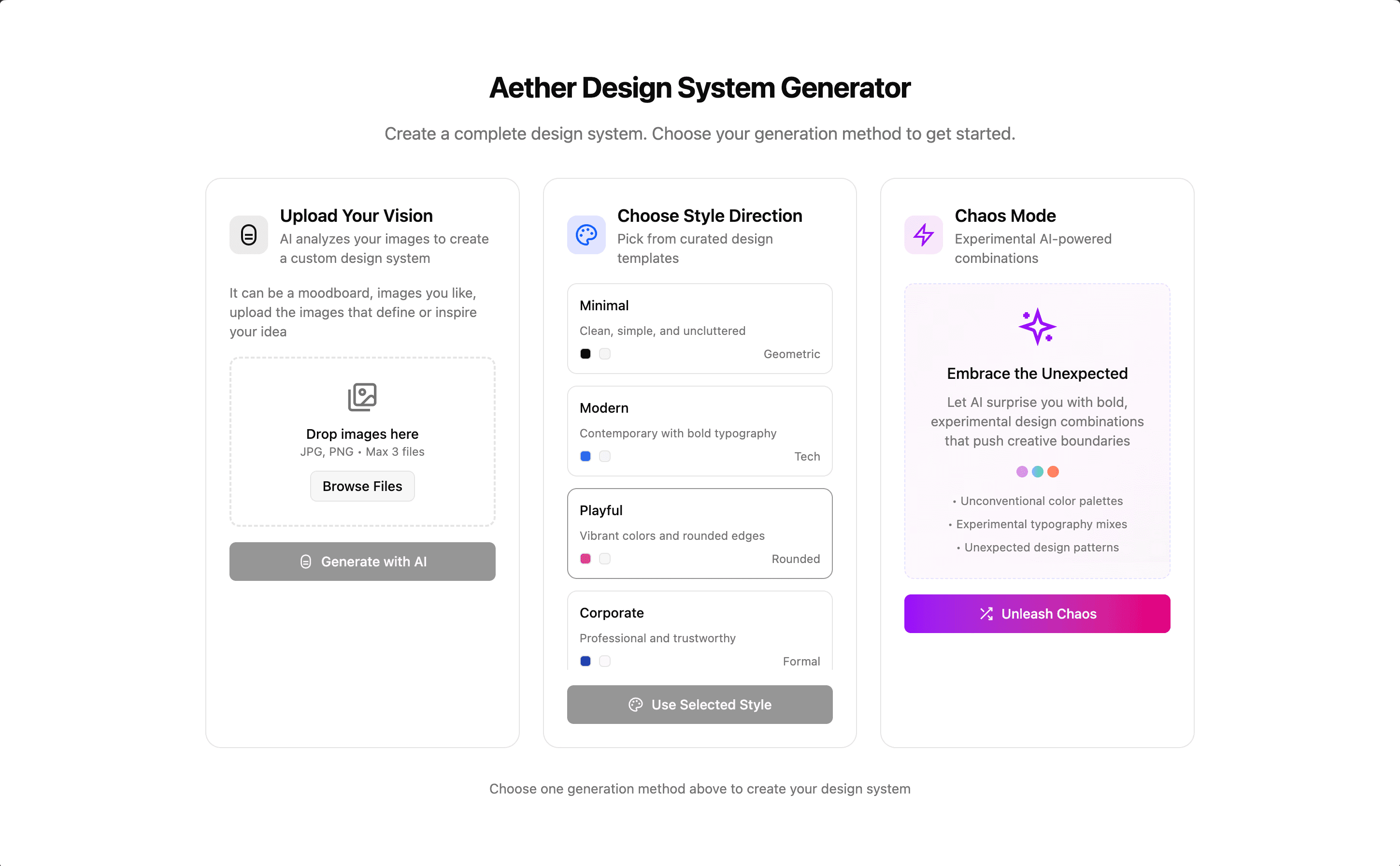
The final UI I ended up with in Figma Make for submission looked alright but far from good. I wanted to make it better.
Shifting from Figma to my own Build
After the Makeathon, I decided to migrate the project to Vercel for free hosting, but quickly understood that there are a lot of things Figma does under the hood. Its custom import statements and file structures made the project completely unusable outside its native ecosystem. For instance:
Figma Make's Version
Version which works
This was too much work since there were a lot of component files to be made changes and manually creating package.json was causing so many errors while running the build locally due to version issues.
To save me from these manual tasks, I took the help of Gemini CLI and Warp.dev. Both are terminal based AI agents which work extremely well to handle tasks like these. I used Gemini CLI to fix all the import statements and Warp.dev a simple prompt to "Create the repository production friendly without changing the UI or components" and they did a good job.
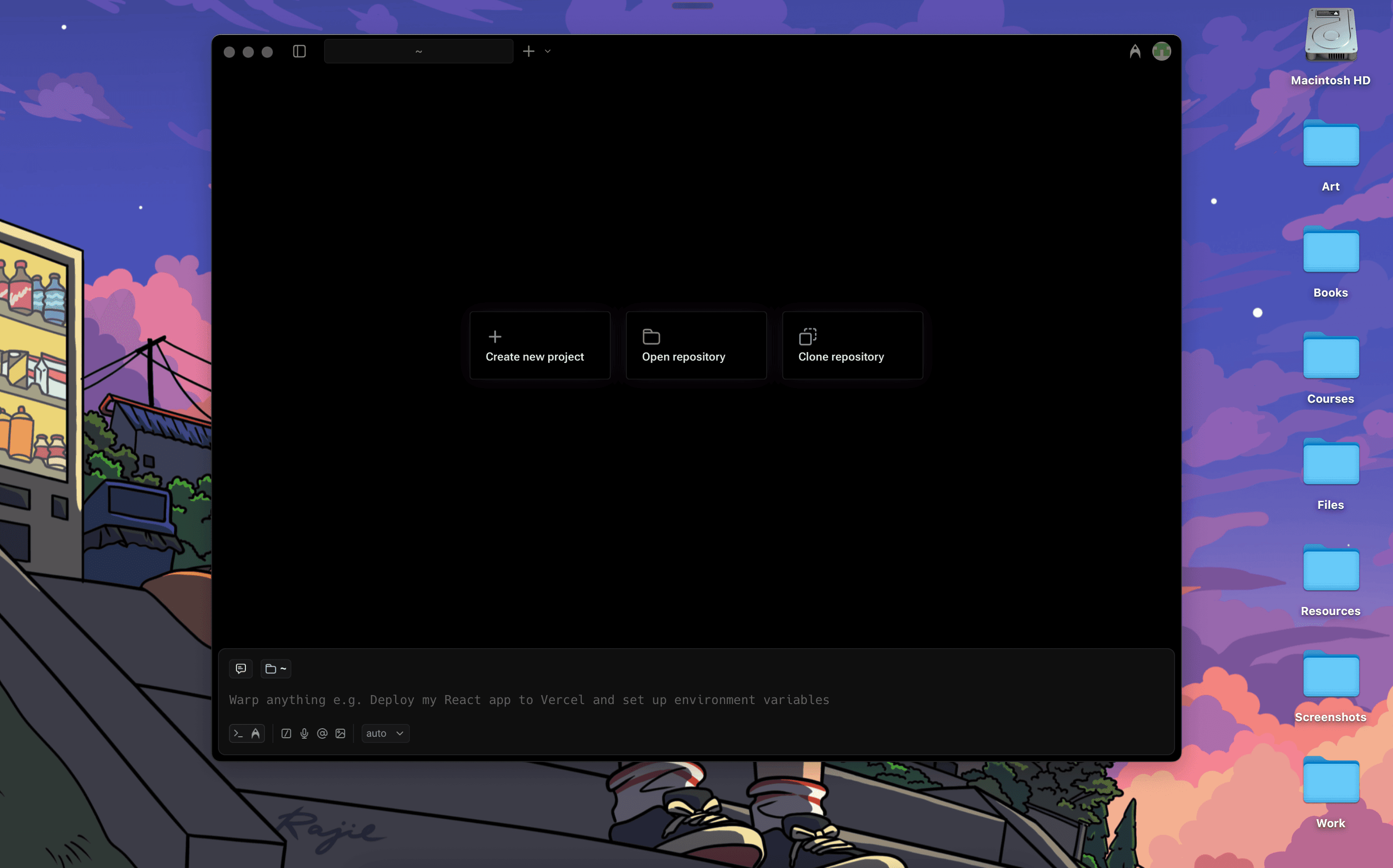
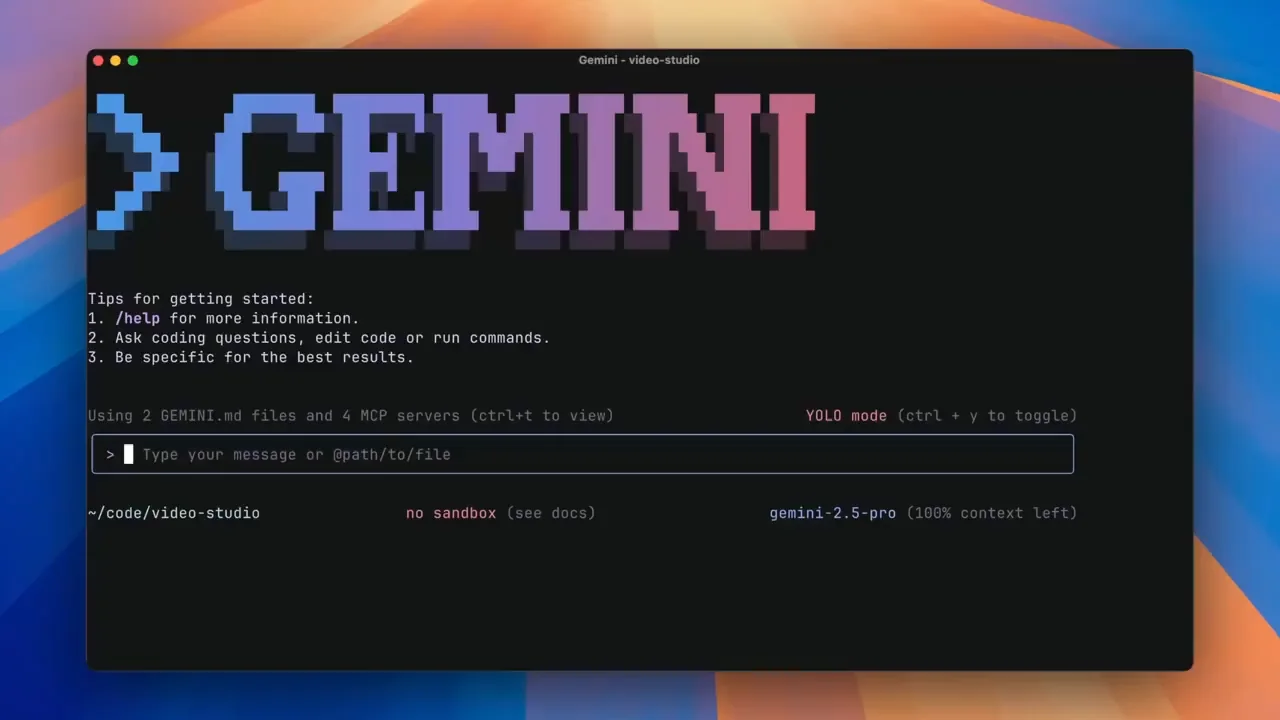
Even after the AI fixes, the site was visually broken. From the codebase that is visible on figma or gets downloadnloaded has a globals.css file but not the tailwind CSS config file which it creates under the hood. This was a crucial peice of the puzzle to ensure proper styling is implemented.
Globals.css I got from Figma
Tailwind.config I had to create additionally
Besides this, my code handled my gemini 2.0 flash API key client side which was okay for a short term designathon entry but really bad for long term purposes so I had to create an environment variable to handle the API for added security.
Over two days, I redesigned the entire UI by manual coding, taking help from tailwind CSS documentation, fixed the component logic, and polished the layout, resulting in a cleaner and more functional design.
Takeaways & Reflection
This project taught me a lot about working with AI tools deeply: from planning to building to fixing code, and then jumping in to code things myself. It showed me how well humans and AI can work together, and reminded me that you need to stick with an idea to really make it work.
This is still just an early MVP though, and with how fast AI tools are changing and improving, there's a good chance someone else will build this same thing or the tools themselves will just add this feature directly into their platforms. But currently I see this problem, a gap in AI front end dev tools which I wished to fix.